 Mi IDE o complador de programacion en Java
Lo que haremos es una mini galeria sencilla de imagenes in usar una base de datos, ya que es bien sabido que una base de datos es como un conjunto de vectores asi que usaremos vectores como ven....
Abrimos Netbeans y diseñamos con el editor un pequeño frame y un panel dentro de estos insertamos cada uno de los objetos.
Jlabel, 2 JButton y quedara mas o menos a si..
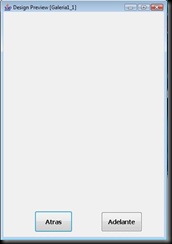
En la fuente del codigo quedara algo asi, Netbeans lo que hace es simplificar el diseño,
| public class Galeria1_1 extends javax.swing.JFrame {
/** Creates new form Galeria1_1 */
public Galeria1_1() {
initComponents();
}
/** This method is called from within the constructor to
* initialize the form.
* WARNING: Do NOT modify this code. The content of this method is
* always regenerated by the Form Editor.
*/
// <editor-fold defaultstate="collapsed" desc=" Generated Code ">
private void initComponents() {
jLabel1 = new javax.swing.JLabel();
jButton1 = new javax.swing.JButton();
jButton2 = new javax.swing.JButton(); setDefaultCloseOperation(javax.swing.WindowConstants.EXIT_ON_CLOSE); jButton1.setFont(new java.awt.Font("Tahoma", 1, 14));
jButton1.setText("Atras");
jButton1.addActionListener(new java.awt.event.ActionListener() {
public void actionPerformed(java.awt.event.ActionEvent evt) {
jButton1ActionPerformed(evt);
}
}); jButton2.setFont(new java.awt.Font("Tahoma", 1, 14));
jButton2.setText("Adelante");
jButton2.addActionListener(new java.awt.event.ActionListener() {
public void actionPerformed(java.awt.event.ActionEvent evt) {
jButton2ActionPerformed(evt);
}
}); org.jdesktop.layout.GroupLayout layout = new org.jdesktop.layout.GroupLayout(getContentPane());
getContentPane().setLayout(layout);
layout.setHorizontalGroup(
layout.createParallelGroup(org.jdesktop.layout.GroupLayout.LEADING)
.add(layout.createSequentialGroup()
.addContainerGap()
.add(jLabel1, org.jdesktop.layout.GroupLayout.PREFERRED_SIZE, 346, org.jdesktop.layout.GroupLayout.PREFERRED_SIZE)
.addContainerGap(org.jdesktop.layout.GroupLayout.DEFAULT_SIZE, Short.MAX_VALUE))
.add(layout.createSequentialGroup()
.add(71, 71, 71)
.add(jButton1, org.jdesktop.layout.GroupLayout.PREFERRED_SIZE, 86, org.jdesktop.layout.GroupLayout.PREFERRED_SIZE)
.addPreferredGap(org.jdesktop.layout.LayoutStyle.RELATED, 66, Short.MAX_VALUE)
.add(jButton2)
.add(50, 50, 50))
);
layout.setVerticalGroup(
layout.createParallelGroup(org.jdesktop.layout.GroupLayout.LEADING)
.add(layout.createSequentialGroup()
.add(jLabel1, org.jdesktop.layout.GroupLayout.PREFERRED_SIZE, 447, org.jdesktop.layout.GroupLayout.PREFERRED_SIZE)
.addPreferredGap(org.jdesktop.layout.LayoutStyle.RELATED, org.jdesktop.layout.GroupLayout.DEFAULT_SIZE, Short.MAX_VALUE)
.add(layout.createParallelGroup(org.jdesktop.layout.GroupLayout.BASELINE)
.add(jButton1, org.jdesktop.layout.GroupLayout.PREFERRED_SIZE, 48, org.jdesktop.layout.GroupLayout.PREFERRED_SIZE)
.add(jButton2, org.jdesktop.layout.GroupLayout.PREFERRED_SIZE, 45, org.jdesktop.layout.GroupLayout.PREFERRED_SIZE))
.addContainerGap())
);
pack();
}// </editor-fold> private void jButton2ActionPerformed(java.awt.event.ActionEvent evt) {
fotoAdelante();
} private void jButton1ActionPerformed(java.awt.event.ActionEvent evt) {
fotoAtras();
}
/**
* @param args the command line arguments
*/
public static void main(String args[]) {
java.awt.EventQueue.invokeLater(new Runnable() {
public void run() {
new Galeria1_1().setVisible(true);
}
});
}
// Variables declaration - do not modify
private javax.swing.JButton jButton1;
private javax.swing.JButton jButton2;
private javax.swing.JLabel jLabel1;
// End of variables declaration
} |
Como ven en la parte de JButton tenemos dos procedimientos que es fotoadelante y fotoatras aqui se va encargar este metodo de moverse dentro de la galeria o mas bien de los vectores.
Agregamos elementos..importamos paquetes
| import java.awt.*;
import java.awt.event.*;
import java.io.*;
import java.util.*;
import javax.swing.ImageIcon;
import javax.swing.JOptionPane; |
y demas elementos
| public class Galeria extends javax.swing.JFrame {
Image foto;
Vector imagenes = new Vector();
int index = 0;
String folder =""; |
Cargamos el album de imagenes de la carpeta donde se encuentran...
| void cargarAlbum(){
imagenes.clear();
index = 0;
String album = ("C:\\herramienta\\hddr\\photos");
File albumCarpeta = new File (album);
folder = albumCarpeta.getName();
System.out.println(albumCarpeta.getName());
File[] fotos = albumCarpeta.listFiles();
for (int i=0; i<fotos.length; i++)
if (fotos[i].isFile()){
imagenes.add(fotos[i].getName());
System.out.println(fotos[i].getName());
}
jLabel1.setIcon(new javax.swing.ImageIcon(folder+"\\"+(String)imagenes.elementAt(0)));
} |
Despues agregamos lo dos procedimiento del movimiento..
| void fotoAdelante(){
System.out.println("Adelante ..");
if ((index+1) < imagenes.size()){
index++;
ImageIcon imagen = new ImageIcon(folder+"\\"+(String)imagenes.elementAt(index));
jLabel1.setIcon(imagen);
System.out.println(index + " : " + folder+"\\"+(String)imagenes.elementAt(index));
}
else
{
JOptionPane.showMessageDialog(null, "Fin de las Fotos del Album","Atencion",JOptionPane.OK_OPTION );
}
}
void fotoAtras(){
System.out.println("Atras ..");
if ((index-1) > -1){
index--;
ImageIcon imagen = new ImageIcon(folder+"\\"+(String)imagenes.elementAt(index));
jLabel1.setIcon(imagen);
System.out.println(index + " : " + folder+"\\"+(String)imagenes.elementAt(index));
}
else
{
JOptionPane.showMessageDialog(null, "Fin de las Fotos del Album","Atencion",JOptionPane.OK_OPTION );
}
} |
Y LISTO, tenemos nuestra galeria de imagenes usando Vectores jejeje que les parece....
 Mi IDE o complador de programacion en Java

